
Install apps on TV
How to Install XAPK, APKS and Split APK Files on Android TV
An XAPK is not one app file, it is a bundle. Inside are a base APK plus split APKs for your language, screen density and CPU, and sometimes OBB game data. APKS (bundletool) and APKM (APKMirror) files are the same idea. A plain APK installer cannot open a bundle, and installing only the base is exactly why you get "app not installed". To install an XAPK on Android TV, use an XAPK installer that installs all the parts in one session: SATV does this from your phone over Wi-Fi, with no unpacking and no computer.
On this page
What is an XAPK file (and APKS, APKM)?
Google Play stopped shipping single APKs for most apps years ago. It now sends each device only the pieces it needs: one language instead of eighty, one screen density, one CPU architecture. That makes downloads smaller, and it means the app on your phone is physically several files, called split APKs.
When a download site packages such an app, it wraps those pieces into one archive. Different sites use different extensions for the same idea:
| Extension | What it is | Opens in a normal APK installer? |
|---|---|---|
| .apk | A single, complete app | Yes |
| .xapk | Zip bundle: base APK + split APKs, sometimes OBB data (used by APKPure and others) | No |
| .apks | Split APK set produced by Google's bundletool or by split APK installers such as SAI | No |
| .apkm | APKMirror's bundle format, normally opened with the APKMirror Installer | No |
Why a plain APK installer fails on XAPK files
Android's own package installer takes one APK at a time unless the app calling it opens a multi-part install session. A file manager hands it the whole archive, which Android cannot read ("There was a problem parsing the package"), or you unpack it and install only the base APK, which installs nothing useful ("App not installed"), because the base expects its splits to arrive in the same session.
This is the single most common sideloading failure. The file downloads fine, the TV accepts it, and the install dies at the last step with a message that explains nothing. Nothing is wrong with the file: the installer was handed one piece of a set. More on that message in "There was a problem parsing the package" on Android TV.
How to install XAPK on Android TV with SATV
- Allow installs on the TV. On Android TV or Google TV no developer options are needed: you allow SATV under "Install unknown apps" (Unknown sources), usually Settings → Device Preferences or Settings → Apps → Security & restrictions → Unknown sources. Android also offers a shortcut the first time it blocks an install. On Fire TV: Settings › My Fire TV › Developer options › Install unknown apps.
- Install SATV on your phone and on the TV. On Android TV and Google TV, the TV half is in the TV's Google Play Store. On Fire TV, follow the first-time setup in how to sideload a Fire TV Stick.
- Pick the XAPK, APKS or APKM file on your phone, or simply pick the installed app (SATV collects its splits). You do not need to unpack anything.
- Choose the TV and send. All the split parts go across together.
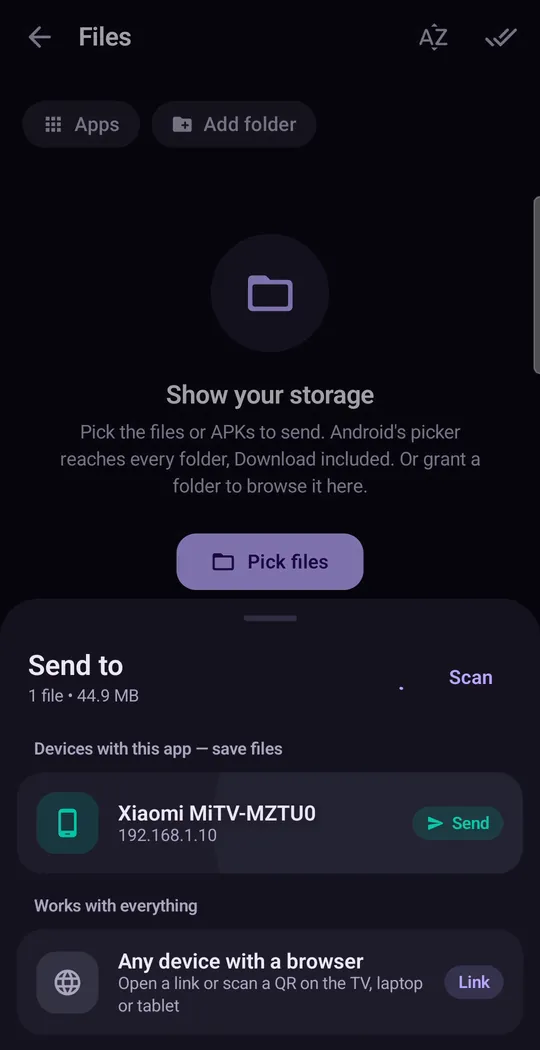
Pick the bundle, then the TV. Shown with our Xiaomi Mi TV as receiver. - Accept and install on the TV. Accept the transfer, then press Install on Android's normal installer. The bundle installs as one app.
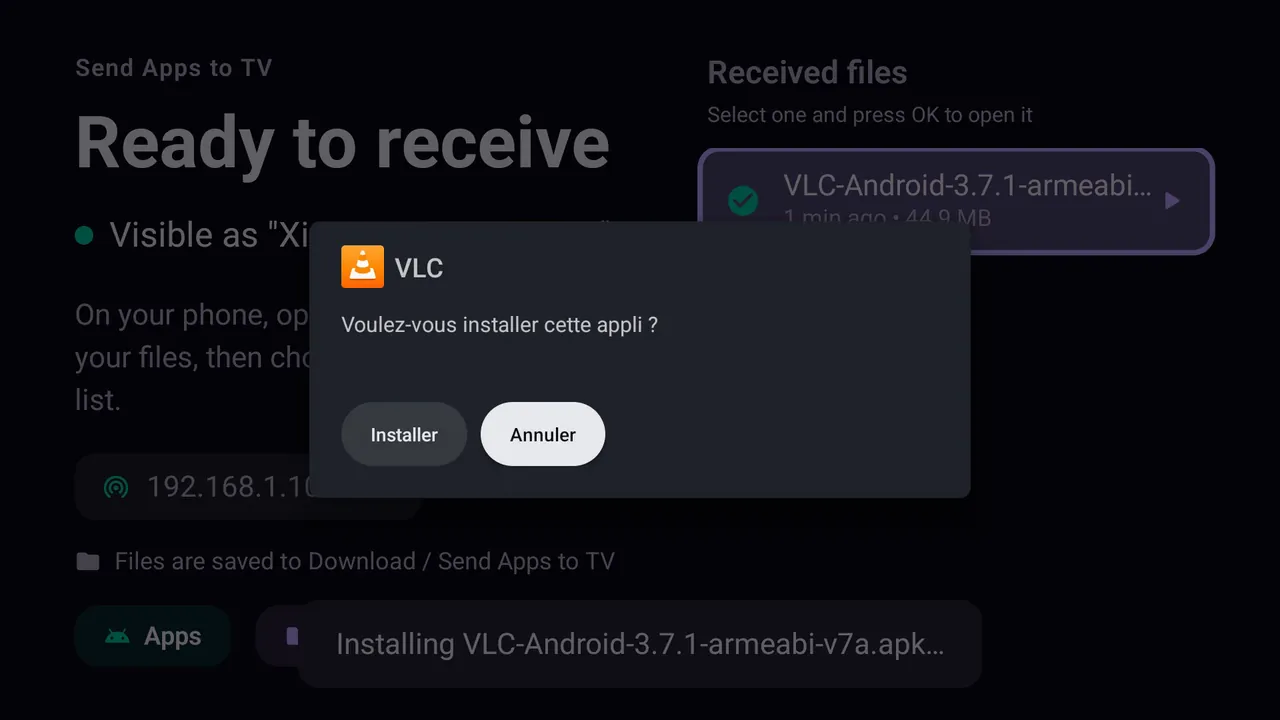
Every install, bundle or single APK, ends on Android's own confirmation on the TV. Shown here for VLC on a Xiaomi Mi TV, French interface (Installer = Install).
XAPK installer options compared
People searching for an "XAPK installer", "APKS installer" or the "APKMirror installer" usually find phone apps. They all install bundles; the difference is where they run.
| Tool | Formats | Runs on | Getting the file to a TV |
|---|---|---|---|
| SATV | APK, APKS, XAPK, APKM, installed apps | Phone sends, TV installs | Built in, over Wi-Fi |
| APKMirror Installer | APKM (and others) | The device it is installed on | You must copy the file to the TV first |
| SAI (Split APKs Installer) | APKS, XAPK, APKM, zipped splits | The device it is installed on | You must copy the file to the TV first |
| APKPure app | XAPK | The device it is installed on | You must copy the file to the TV first |
ADB install-multiple | Unpacked split APKs | A computer | Over the network with debugging on |
On a phone, any of these works. On a TV, the hard part is getting the bundle there and running an installer with a remote, which is why sending from the phone is usually simpler.
How to install split APKs manually (ADB)
If you prefer a computer: rename the .xapk or .apks to .zip, extract it, then connect to the TV and install every APK in one command:
adb connect <tv-ip>adb install-multiple base.apk split_config.armeabi_v7a.apk split_config.en.apk split_config.xhdpi.apk
If the XAPK also contains an Android/obb/<package> folder, copy it to the same path on the TV's storage before opening the app. Full ADB setup is in how to install APK on Android TV.
Can I convert XAPK to APK?
Only in one case. If the XAPK contains a single APK plus OBB data, you can extract that APK and install it normally, then copy the OBB folder yourself. If it contains split APKs, there is no clean "XAPK to APK" conversion: the splits are separate signed files that must be installed together. Tools that merge them into one APK have to re-sign it, so it no longer matches the developer's signature, cannot be updated over the original and can fail in odd ways. Installing the bundle as it is, with a split APK installer, is the better route.
Still says "app not installed"?
Once the split problem is out of the way, three causes remain:
| Cause | How to tell | Fix |
|---|---|---|
| Wrong CPU architecture | The bundle was made for arm64 and the TV runs 32-bit Android, common on budget boxes and older Fire TV | Get the bundle for armeabi-v7a or a universal build |
| Android version too old | Usually shows as a parse error instead | Find an earlier release of the app |
| An older copy already installed | Signature mismatch with the existing app | Uninstall the old one first |
Storage problems and the rest are covered in the App not installed fix guide.
Unknown sources exists so you can install your own software. Only install apps you have the right to use, from sources you trust: a bundle from an unknown site can contain anything.
Questions people ask
What is an XAPK file?
A zip bundle containing an app's base APK plus its split APKs (language, screen density and CPU parts), and sometimes OBB game data. It is an archive, not an app, which is why Android will not install it directly.
Why does my XAPK say "app not installed"?
Almost always because only the base APK reached the installer. The splits have to be installed in the same session, together. An XAPK installer that understands the bundle does that for you.
Can I convert XAPK to APK?
Only when the XAPK holds a single APK plus OBB data. Bundles with split APKs cannot be cleanly merged into one APK without re-signing, so install the bundle as it is.
What is the best XAPK installer for Android TV?
Phone installers like SAI, APKPure or the APKMirror Installer need the file on the TV first. SATV installs the bundle on the TV straight from your phone over Wi-Fi.
How do I install an XAPK on a Firestick or Google TV?
The same way: send the bundle from your phone with SATV. On Fire TV, enable Install unknown apps in Developer options first; Vega OS models cannot install APKs at all.
Can Android TV open an .xapk without an app?
No. Android's installer cannot read the bundle on its own. You need a split APK installer or ADB.
Do I need a computer or ADB?
No. With SATV everything happens over your own Wi-Fi between the phone and the TV. ADB is an alternative if you prefer a computer.